📌 Clipbeam Review
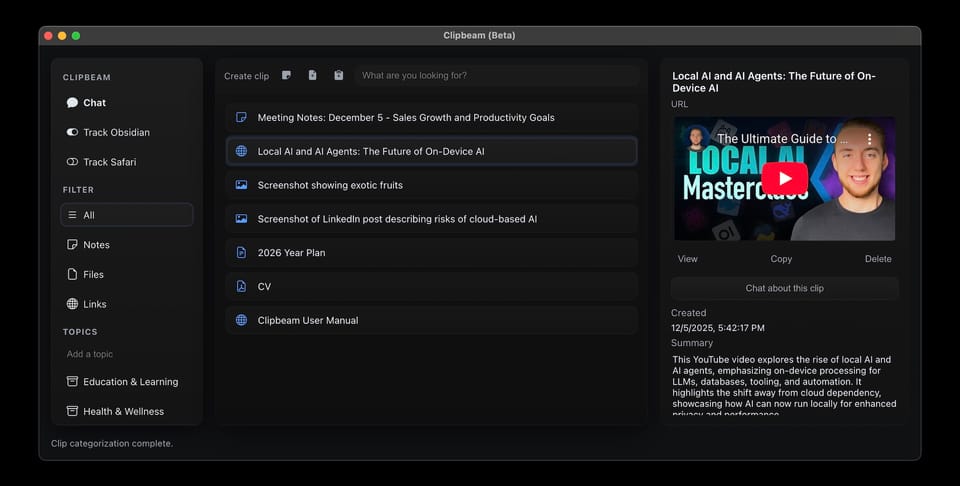
“A second brain that truly stays with you — but is it the AI assistant we’ve been dreaming of?”
If you’ve ever looked at your screen with a mild panic attack — too many tabs, notes scattered across five apps, screenshots buried in folders you forgot existed — then Clipbeam might feel like a breath of fresh air.
It bills itself as a private, offline “super-memory” for your Mac or — a place that automatically captures, organizes, and lets you search and chat with all your stuff without sending it off to someone else’s server.
So is it worth your time — especially if you care about privacy, control, and peace of mind? Let’s unpack it.
🧠 What Clipbeam Actually Does
Think of Clipbeam like a little digital librarian living on your own machine:
- You clip anything — web pages, text snippets, docs, screenshots, voice recordings, even video links — and Clipbeam stores it as a “clip.”
- It auto-tags and summarizes everything so it’s easier to find later.
- You can ask questions like “what were the ingredients for that recipe I saved?” and Clipbeam answers from your own clips.
- There’s a search bar that understands meaning, not just dumb keyword matches.
- You can chat with it about your clips like an assistant.
- It even does voice dictation and voice chat, so you can talk to it hands-free.
In other words, it tries to feel like a personal knowledge base — or a “second brain” — but with a very strong emphasis on staying private.
🔒 Privacy: One of the Best Bits
This is where Clipbeam really shines.
- Everything stays on your device. All AI processing — summarizing, tagging, searching, chatting — runs locally, not on a server.
- Your data isn’t sent anywhere. Clipbeam doesn’t collect your notes, files, recordings, or clips.
- No ads. No trackers. No corporate data mining.
- You can even turn off anonymous usage stats if you’re really serious about privacy.
If you care about keeping your personal thoughts, work documents, and research private — not even encrypted on someone else’s server — this local-only design is a huge plus.
🚀 What People Like About It
From real user chatter online:
- Easy to organize scattered content — drag, paste, or keyboard shortcut (⌘ + C + B) and it clips instantly.
- Search is surprisingly clever, even with natural-language queries.
- Voice features get praise — dictation and voice chat are smoother than expected for a local app.
- Many users in productivity communities find it refreshing to have a tool that doesn’t feed their data into an external AI service.
One Redditer summed it up with a playful enthusiasm: it’s like the app “takes the stuff I care about and actually remembers it for me.”
🤔 The Catch(es)
Nothing’s perfect — including Clipbeam.
🧠 Smaller AI “Brain”
Because it runs locally and doesn’t tap into massive cloud models, the AI isn’t as world-smart as the big online assistants. It’s excellent at summarizing your own stuff, but won’t know everything about the world out of the box — and sometimes can get things wrong or miss nuance.
The FAQ even gently warns you: it’s tuned more for short clips than giant PDFs.
📱 No Mobile App Yet
There’s no iPhone or Android version yet, so your clips live on your computer — not in your pocket. You can work around this with cloud-synced folders, but it’s not the same as a full mobile app experience.
🛠️ Still Beta
Clipbeam is actively being developed — which is great for improvements, but means occasional quirks, limited documentation, and evolving features. Some community members have called for better UX and polish.
🆓 Pricing & Accessibility
Right now, Clipbeam is free during beta, with no hard pricing published yet. A few folks have asked in forums whether future costs will appear, but the official stance is that it remains free while it’s shaped by user feedback.
🏁 Verdict: Who Is Clipbeam For?
Clipbeam is a great fit if you:
- Want your AI assistant to stay private and local.
- Hate feeling like your data is being “trained on.”
- Love powerful search and recall for your own stuff.
- Prefer offline tools that don’t need accounts or cloud servers.
Clipbeam might not be right for you if:
- You need mobile access baked in.
- You want world-scale AI intelligence right out of the box.
- You want polished, finished features — it’s still beta.
🧠 Bottom Line
Clipbeam is a promising, privacy-first tool for people overwhelmed by their own digital lives. It doesn’t send your data into the cloud, doesn’t secretly train models on your notes, and doesn’t make you trade privacy for convenience — and for that alone, privacy-minded folks will love it.
It’s not perfect yet, but it’s one of the most genuinely private AI assistants out there, and that’s worth paying attention to.
—
Try it if you want your own AI that literally lives with you, not in someone else’s servers.